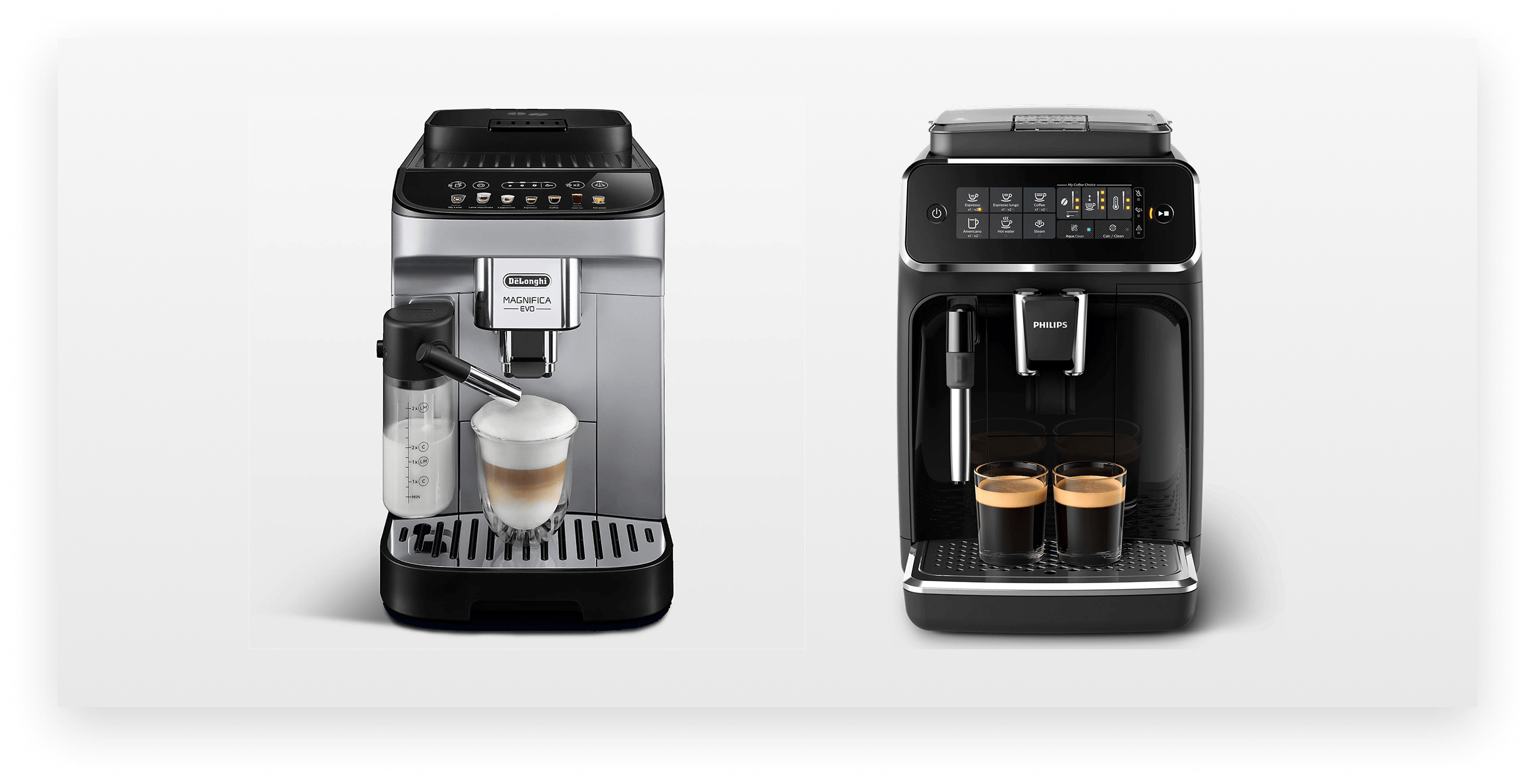
The two machines selected for the UX evaluation were the DéLonghi Magnifica EVO and Philips 3200.

Ninja was preparing to enter the super-automatic espresso machine market. During the product development process, they needed to understand what the best-in-class user experience looked like among comparable machines, where these competitors fell short, and what it would take for Ninja to stand out. We partnered with their team to evaluate two leading machines on the market, synthesize findings into a clear competitive picture, and run a collaborative workshop to define the experience principles Ninja would need to hit.
Super-automatic espresso machines are technically complex products. They grind, brew, steam, and self-clean, often with minimal user guidance. The challenge isn’t just making coffee. It’s designing an experience that feels approachable on day one and stays reliable through months of daily use.
Ninja wanted to understand how competitors handled this challenge. To do that, we developed a coffee journey framework that organized the UX evaluation across four areas: first-time setup, learning the machine, daily use, and cleaning and maintenance. The goal wasn’t a feature checklist. It was to understand what was working, what was frustrating users, and where Ninja had a real opportunity to do something meaningfully better.

The two machines took fundamentally different design philosophies. DéLonghi invested heavily in physical affordances and smart constraints. The machine uses visual contrast on critical components like the grind wheel, milk container, and water tank to reduce errors, applies color to guide users through less obvious interactions like removing the infuser, and adapts its interface to the machine’s actual state, hiding milk drink options when the container isn’t attached and suppressing alerts until they’re relevant.

Together, these details guide users through everyday interactions without ever having to reach for a manual. Where DéLonghi fell short was in hierarchy. Secondary controls, like coffee strength, sat awkwardly above the drink selections, there was no stop function during brewing, and the multi-piece milk frother was genuinely frustrating to clean.
Philips prioritized customization and household flexibility. The interface reveals options progressively from left to right, saves drink settings per user, and includes a dedicated Play/Stop button that gives users clear control mid-brew. Philips also took a more thoughtful approach to cleaning, providing a detailed schedule that tells users exactly when and how to clean each component, dishwasher-safe parts that integrate maintenance into a normal kitchen routine, and QR codes linking directly to video tutorials for more complex tasks like cleaning the brew group.

But the customization came with a cost. Giving users independent control over both coffee strength and water volume without explaining the relationship between them led to unintended results like watery coffee. Persistent alert and cleaning icons cluttered the interface regardless of whether action was needed, and the milk spout design made accurate pouring difficult to gauge.
Both machines revealed the same underlying tension. They promise simplicity, but that promise breaks down in specific moments: initial setup, milk drink preparation, and maintenance. These are the moments where guidance, physical design, and UI clarity matter most, and where both competitors left room for improvement.
Beyond physical design, understanding how each machine handled its touch UI was central to the evaluation. Three usability patterns emerged as clear lessons: progressive UI that guides users through each step in sequence, adaptive interfaces that reduce cognitive load by surfacing only what the user needs at that moment, and play/stop controls that let users start and stop the brew process on demand.
DéLonghi organized its interface into two clear tiers: drink selections across the bottom, and secondary controls above. The approach made the primary action obvious, but placed maintenance settings and grinding controls in an awkward position that interrupted the visual hierarchy. There was no stop function, which created uncertainty during brewing.

Philips took a left-to-right progressive disclosure approach, revealing options sequentially as the user made selections. The experience felt more guided as a result, and a dedicated play/stop button gave users direct control over when the brewing process started and stopped.
Both UIs handled smart constraints differently. DéLonghi’s screen adapted to the machine’s actual state, hiding milk drink options when the milk container wasn’t attached and suppressing alerts until they were relevant. Philips showed all options regardless of what accessories were connected, leaving users to discover incompatibility after the fact.

The central question we wanted to answer in the workshop was straightforward but strategically important: what would it take to move a Keurig user to a Ninja super-automatic machine? To answer it, we ran a think, feel, do exercise across two areas of the coffee journey framework: unboxing & setup, and cleaning & care. The exercise revealed how high the bar actually was. Users coming from a Keurig expect simplicity bordering on invisibility. A super-automatic machine asks significantly more of them, and Ninja’s opportunity was to close that gap.
With that foundation in place, we moved through all four areas of the coffee journey framework organized around three questions:
The opportunities that surfaced became the basis for four experience goals: progressive confidence building, premium yet approachable, a guided journey, and proactive prevention and recovery.
Together, the competitive evaluation and workshop gave the Ninja team a clear picture of where the bar was set, where it needed to be raised, and what a better experience could look like at every step of the coffee journey.
We work as an extension of your team, bringing UX thinking, rapid prototyping, and iterative design from early research all the way to development-ready designs.
We help teams design AI-powered products that users trust. From interaction design to AI UX, we help make complex, variable AI behavior feel intuitive and human.
We evaluate your product with the same critical eye your customers bring, with the design vocabulary to explain what's working, what isn't, and what to do about it.